
Features
Integrations Pricing Developers Guides

Get your links and QR codes

One link per product, plus short links and QR codes for offline use.

For affiliates 1 min read 4 steps 1 screenshots

Every product you can promote has its own tracking link. Anyone who buys through it inside the attribution window earns you a commission.

1

Copy a product link

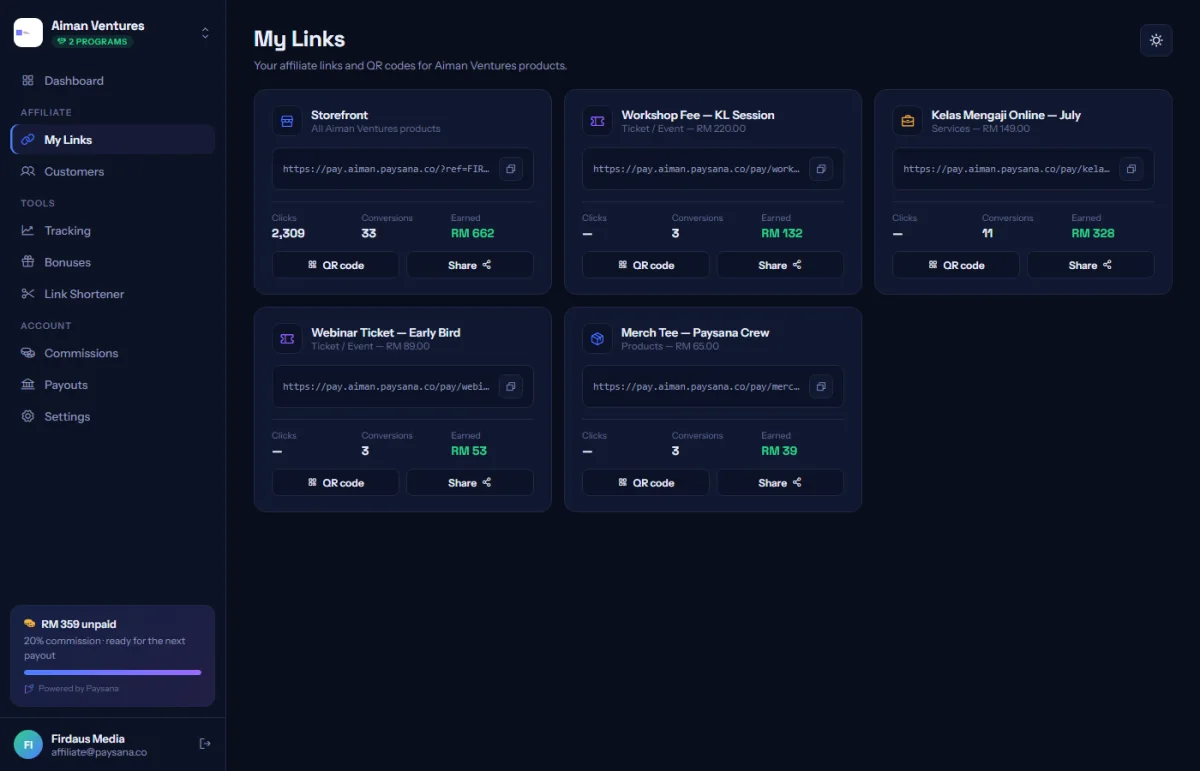
My Links lists every product in the programme with your own tracking link beside it, ready to copy. Each one also has a scannable QR code for print, slides or a stall.
app.paysana.co
My Links: a tracking link and QR code for every product you can promote.
2

Share it wherever you like

A message, a post, a bio, an email. The link drops a first-party cookie when someone opens it, and a purchase inside the window is credited to you.

3

Shorten it if it needs to be short

The Shortener turns any link into something short enough to say out loud, and counts the clicks so you can compare where you posted it.

4

Check the clicks

Click counts appear on your dashboard. A link with clicks but no orders usually means the offer, not the link, needs work.

Worth knowing

  • The attribution window is set by the business, and you can see how long it is on your dashboard.
  • A buyer who blocks cookies or switches device may not be attributed — no tracking is perfect, and we do not pretend otherwise.

Read next

Still stuck? Send us a message and a person will answer — usually within one working day.
Contact us

Ready to try it?
Start free today.

Join the businesses already using Paysana to collect payments, send invoices and grow.

Free plan forever · No card to sign up · Your own gateway
We use cookies to measure how this site is used and how well our advertising works. They are optional — the site works exactly the same either way. Read our privacy policy.