Send a blast to a real customer segment and see what it did.
Growing1 min read4 steps1 screenshots
Campaigns go out under your own sender identity, so replies come back to you. Your audiences are built from real purchase behaviour — there is nothing to export or keep in sync.
1
Pick who hears from you
Choose a segment — new, returning or VIP customers — or everyone. Segments are worked out from what people have actually bought and spent, and anyone without the right contact detail for your channel is skipped.
app.paysana.co
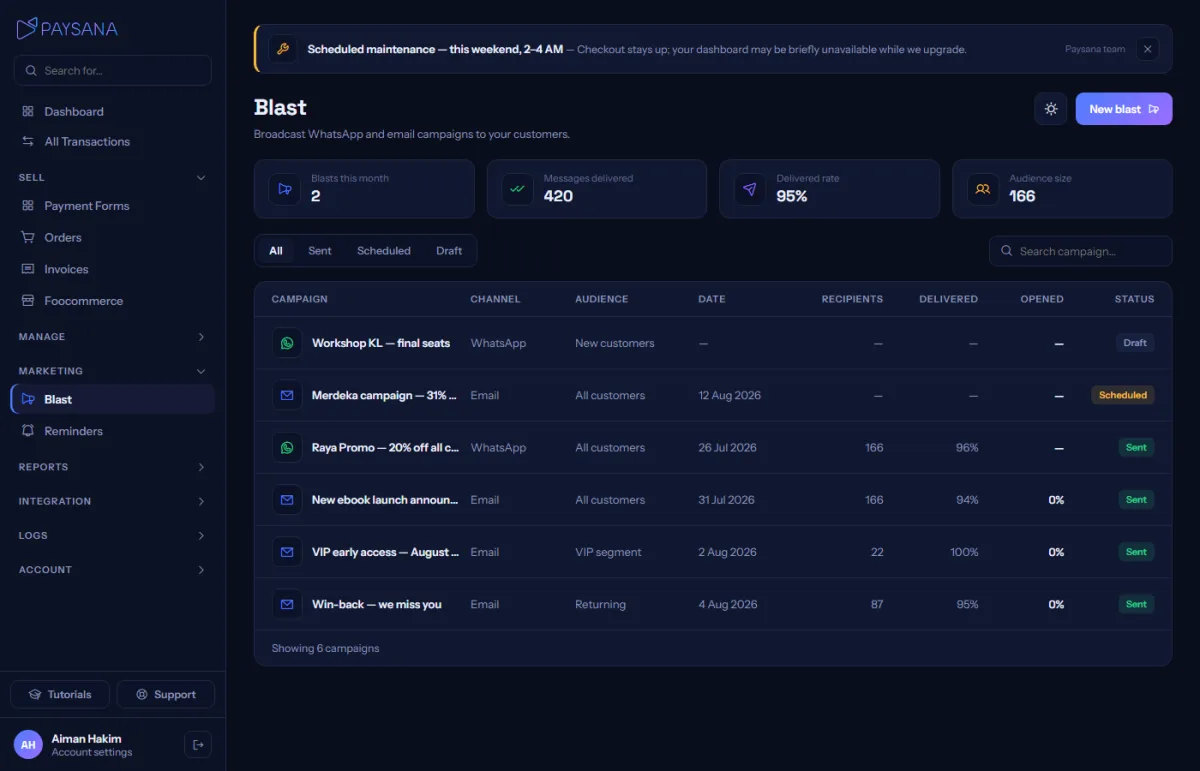
The blast composer, with real delivered, open and click rates on past campaigns.
2
Write it once
Use placeholders to fill in each recipient’s name, their last product or their order reference. Choose email or WhatsApp; WhatsApp goes through your own connected sender.
3
Send now, or schedule it
Send immediately, pick a time, or save a draft. Scheduled campaigns go out on their own. If the audience is larger than your credit balance the campaign stays a draft rather than sending to only some of them.
4
See what happened
Delivered, opened and clicked per campaign — measured, not estimated. A campaign nobody opened honestly reports zero.
Worth knowing
Marketing sends use credits; order receipts and other transactional mail never do and always go out, even at a zero balance.
Only contact people who bought from you or agreed to hear from you — you are the sender of every campaign you create.
Every campaign carries an unsubscribe link, and anyone who uses it is removed from your future sends automatically. That is the law in most places your buyers live, and Gmail and Yahoo now require it of anyone sending in bulk. Opted-out buyers are excluded before the credit cost is worked out, so you are never charged for a message that will not be sent.
An unsubscribe applies to you only — it does not remove the buyer from any other shop on Paysana. And it never stops their receipts or delivery updates, which are records of their own orders rather than marketing.
A large send runs in the background: the status shows "Sending" and the page updates as it goes, rather than making you wait on a loading screen.
Free plan forever · No card to sign up · Your own gateway
We use cookies to measure how this site is used and how well our advertising works.
They are optional — the site works exactly the same either way.
Read our privacy policy.