
Features
Integrations Pricing Developers Guides

Work with your customer list

Segments that build themselves, and what you can do with them.

Running your business 1 min read 4 steps 1 screenshots

Every checkout creates or updates a customer record. You never import anything, and the segments are worked out from what people actually bought.

1

Let it build itself

A buyer is matched on their email, then their phone. Their order count and lifetime spend roll up across both your payment links and your shop, and correct themselves when you refund.
app.paysana.co
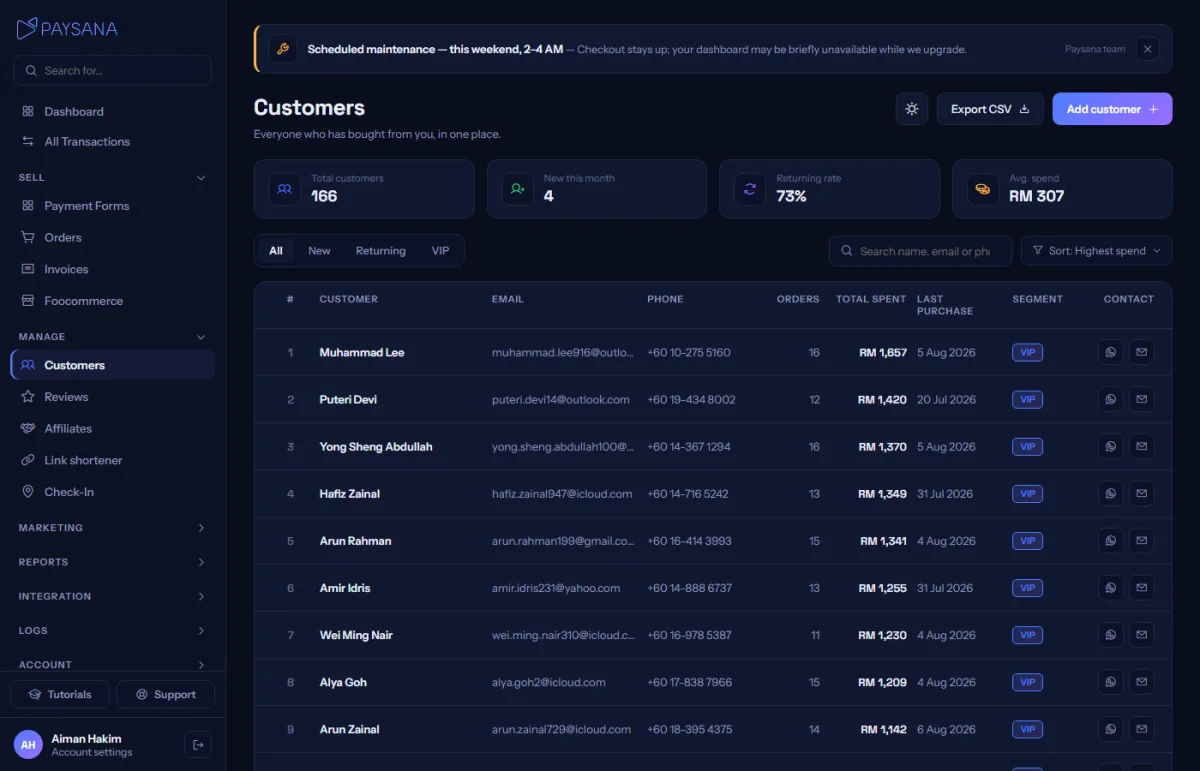
Customers, with segment chips, lifetime spend and contact shortcuts on every row.
2

Read the segments

New, returning and VIP are derived from real spend and order counts. They are the same segments your campaigns use as audiences, so the two can never disagree.

3

Filter, search and export

Search by name, email or phone, filter by segment, sort, and export the whole list to CSV. The filtering happens in the database, not in the page, so it works across every customer you have.

4

Reach one person

Each row has WhatsApp and email shortcuts where you hold that contact detail. You can also add a customer by hand for a sale that happened somewhere else.

Worth knowing

  • A customer needs an email or a phone number — that is what checkout matches on when they buy again.
  • Lifetime spend counts money you kept, not money that briefly arrived, so a refunded order does not inflate anyone’s total.

Read next

Still stuck? Send us a message and a person will answer — usually within one working day.
Contact us

Ready to try it?
Start free today.

Join the businesses already using Paysana to collect payments, send invoices and grow.

Free plan forever · No card to sign up · Your own gateway
We use cookies to measure how this site is used and how well our advertising works. They are optional — the site works exactly the same either way. Read our privacy policy.