
Features
All features
From a paid order to a delivered one — and back again when you need to refund.
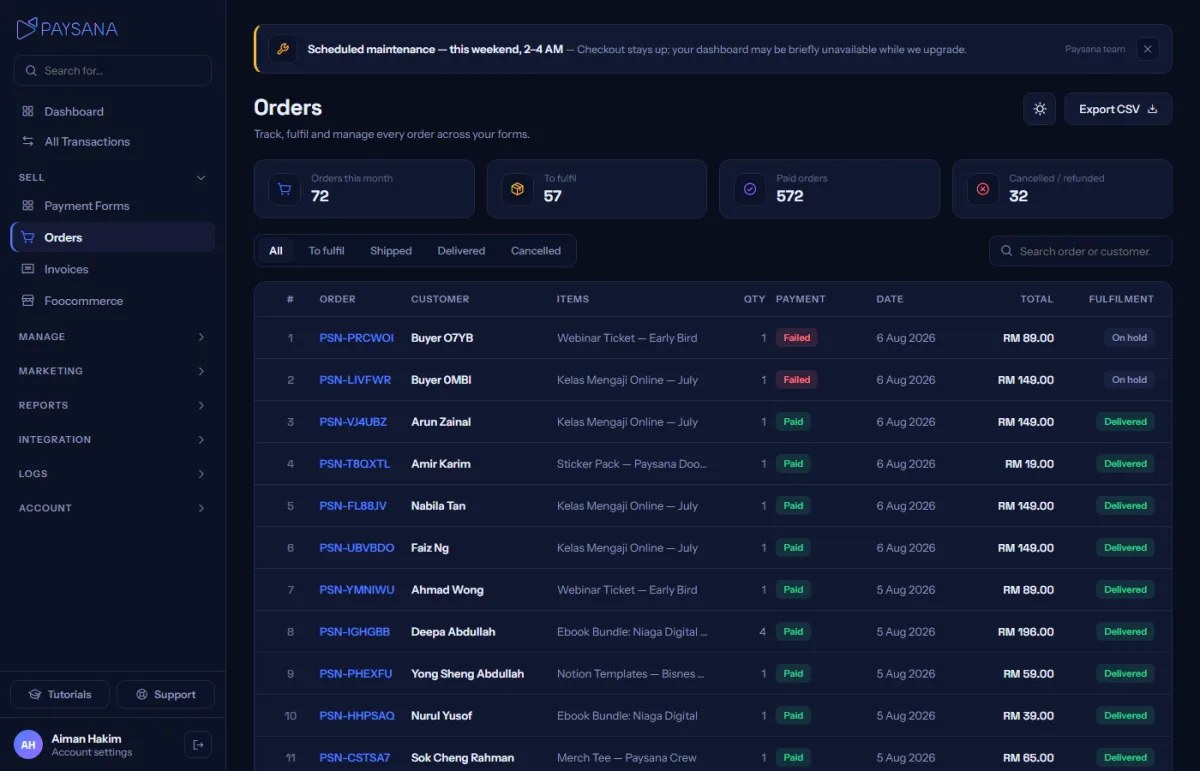
Every sale from every channel lands in one list. What you do next depends on what was bought: digital goods and tickets deliver themselves, physical ones wait for you to ship.
Orders shows everything from both your payment links and your shop, with status tabs so what needs doing is obvious. Search by reference, buyer name or email, and export any view to CSV.
The detail view shows the buyer, what they bought, their delivery and billing addresses, their answers to your custom questions and, for events, every attendee name.
Mark as shipped with the courier and tracking number, or — if you have connected a courier — book the shipment straight from the order and let the tracking number fill itself in. Either way the buyer is emailed automatically.
Refund the whole order or part of it, with a reason recorded. Stock returns, any affiliate commission reverses, downloads are revoked and every revenue figure adjusts — all from one action.
Join the businesses already using Paysana to collect payments, send invoices and grow.