
Features
Integrations Pricing Developers Guides

Sync buyers into your email platform

Send every buyer into the marketing account you already use.

Growing 1 min read 4 steps 1 screenshots

If you already run your list somewhere else, connect it and every buyer lands there automatically — from both your payment links and your shop.

1

Connect your platform

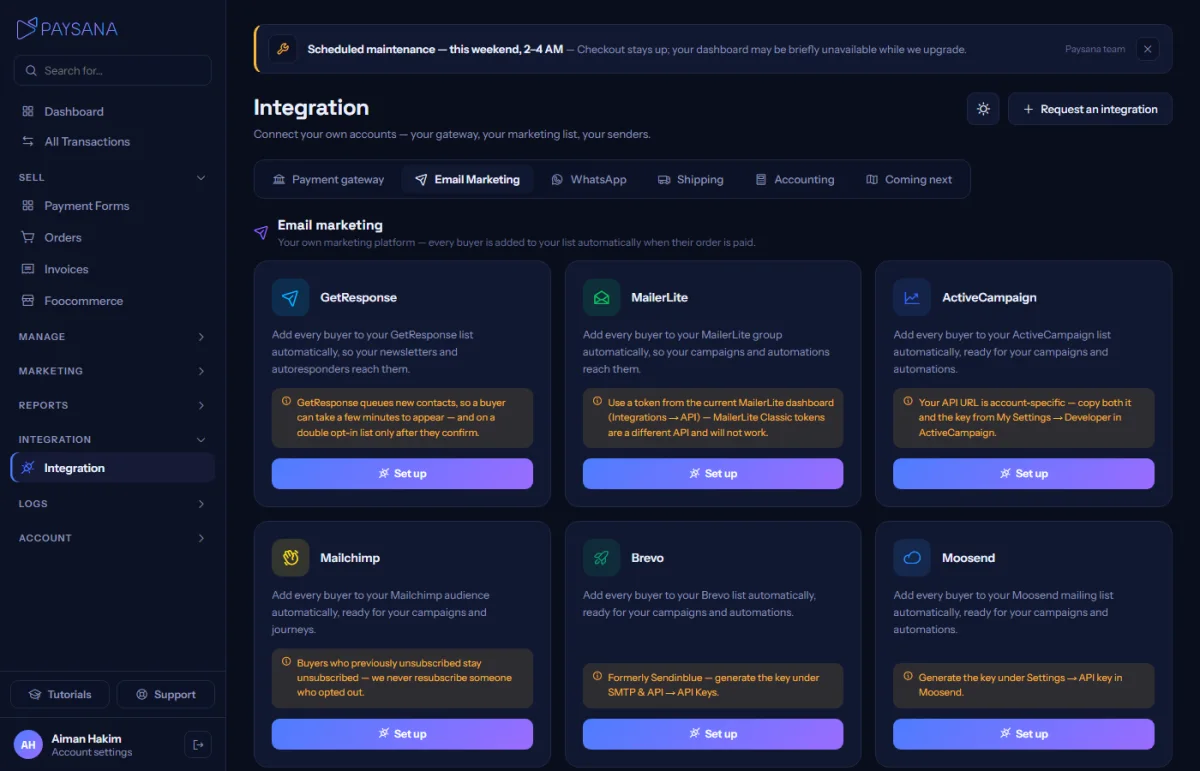
The Email Marketing tab in the Integration hub lists the supported platforms. Connect the one you use with your own API key; we verify it immediately, so a bad key is caught before it silently drops buyers.
app.paysana.co
The email marketing tab. Connect one platform with your own credentials.
2

Pick a default list

Choose which list new buyers join. We read the real lists from your account rather than asking you to type an ID, so there is nothing to copy across.

3

Route per product, if you want

The Notifications tab on any form lets you pick a different list for that product’s buyers. Leave it empty and they go to your default.

4

It runs on every sale

A buyer is synced after the money is committed. If the sync fails, the sale still completes — a marketing hiccup is never allowed to break a paid order.

Worth knowing

  • One platform at a time: connecting a second switches the first off, because syncing a buyer to two would double your contact costs.
  • Switching platform clears your per-product list choices, since a list ID only means something to the platform that issued it.

Read next

Still stuck? Send us a message and a person will answer — usually within one working day.
Contact us

Ready to try it?
Start free today.

Join the businesses already using Paysana to collect payments, send invoices and grow.

Free plan forever · No card to sign up · Your own gateway
We use cookies to measure how this site is used and how well our advertising works. They are optional — the site works exactly the same either way. Read our privacy policy.