
Features
Integrations Pricing Developers Guides

Add your team

Give staff their own sign-in, with a role that limits what they can reach.

Account & billing 1 min read 4 steps 1 screenshots

Sharing one login is the thing to avoid. Each person gets their own account, and a role decides what they can touch.

1

Invite a member

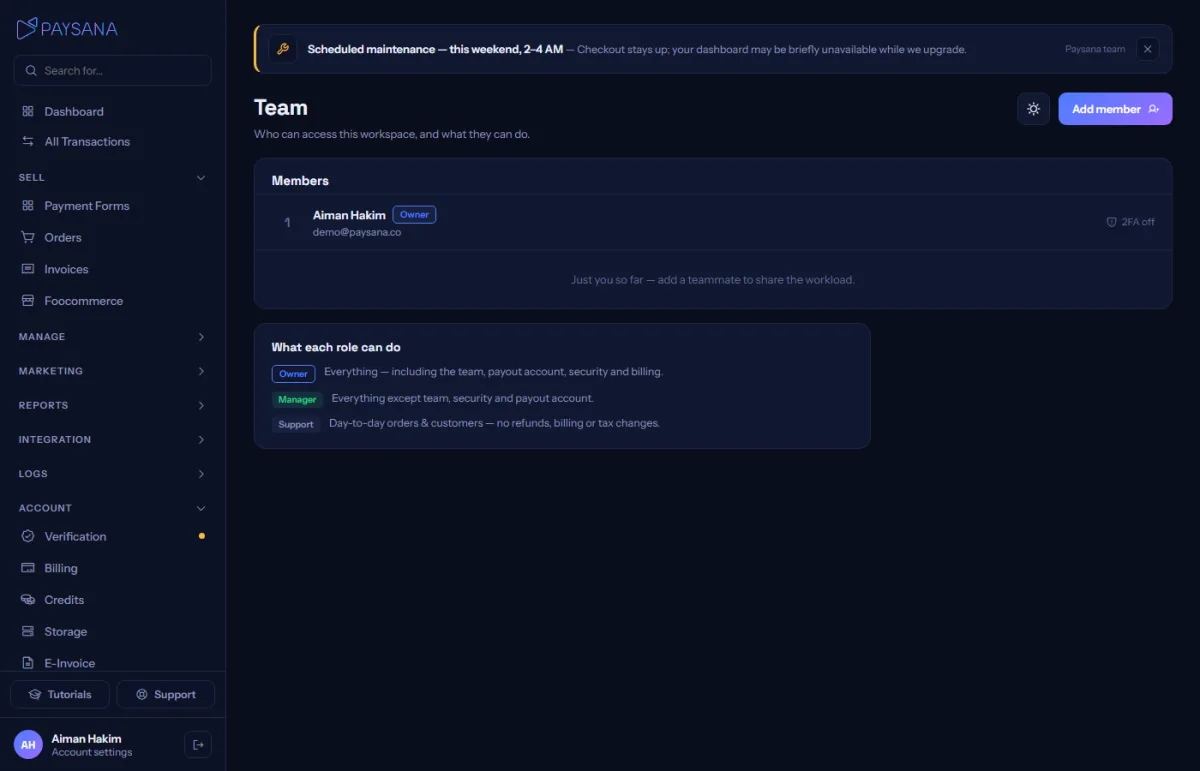
Team under Account is where you add someone. A temporary password is shown once — pass it on, and they set their own on first sign-in.
app.paysana.co
Your team, with each member’s role and status.
2

Pick a role

Manager or support. Support can help customers without touching refunds, billing or your gateway credentials. You can change someone’s role at any time.

3

Know what is enforced

Role limits are checked on our servers, not just hidden in the interface — so a support member cannot reach a manager-only action by guessing a URL.

4

Remove access instantly

Deactivate a member and they are locked out immediately. Their history stays, so you can still see who did what.

Worth knowing

  • Changing a password acts on whoever is signed in, so a team member can never change the owner’s password.
  • Only the owner can manage the team, reach security settings, or connect gateways.

Read next

Still stuck? Send us a message and a person will answer — usually within one working day.
Contact us

Ready to try it?
Start free today.

Join the businesses already using Paysana to collect payments, send invoices and grow.

Free plan forever · No card to sign up · Your own gateway
We use cookies to measure how this site is used and how well our advertising works. They are optional — the site works exactly the same either way. Read our privacy policy.